
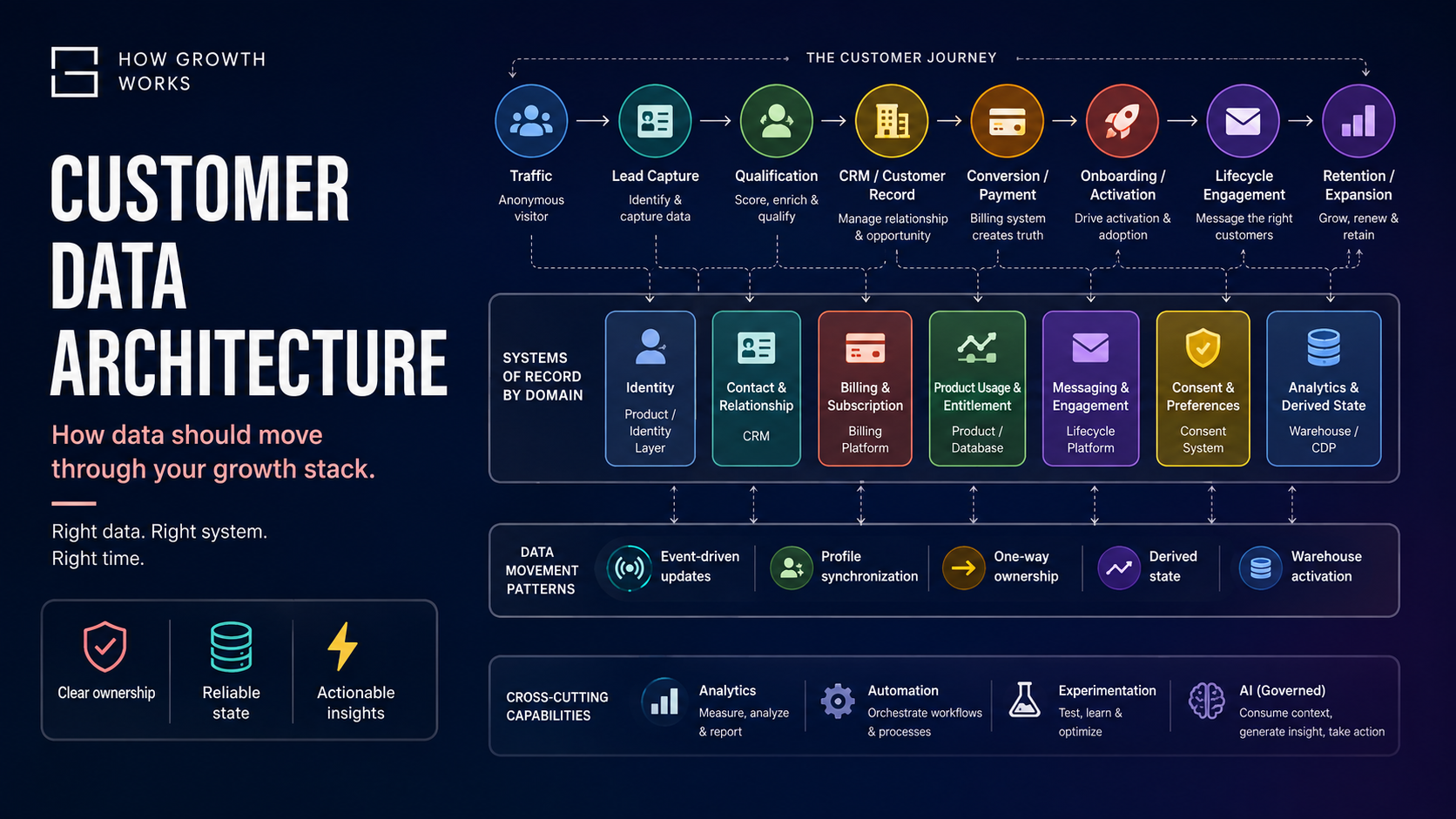
A customer visits your website, reads three articles, joins your email list, returns through a paid campaign, starts a trial, buys a subscription, completes onboarding, uses the product repeatedly, ignores two lifecycle emails, upgrades six months later and eventually cancels.
How many customer records did that create?
Potentially dozens.
Your analytics platform sees a visitor and later an identified user. Your CRM sees a contact. Your payment processor sees a customer and a subscription. Your lifecycle platform maintains a messaging profile. Your product database has an account. Your automation layer copies selected fields between them. Advertising platforms have their own identifiers again.
The architectural problem is not simply connecting these systems.
It is deciding which representation of the customer is authoritative for which kind of information, how changes should propagate, and which systems actually need to receive them.
That distinction matters because a modern growth stack should not try to move every piece of customer data everywhere.
It should move the right data to the right system at the right time, with clear ownership of each important type of customer state.
The goal is not maximum connectivity.
The goal is coherent customer state.
Customer Data Architecture Is Really Customer State Architecture
Most growth stacks are designed application-first.
A business buys a CRM, an email platform, analytics, Stripe, an automation tool and perhaps a CDP. Then the question becomes:
How do we connect everything?
That is often where the trouble starts.
The more useful question is:
What do we currently know about this customer, which system is authoritative for that knowledge, and who else needs to know when it changes?
Consider something as simple as:
subscription_status = active
That property might exist in Stripe, your CRM, your lifecycle platform, your application database and your analytics platform.
But those five copies should not have equal authority.
If the customer’s payment fails and Stripe changes the subscription to past_due, Stripe is the system that knows that financial state has changed.
Your CRM may need to receive the updated state.
Your lifecycle platform may need it to trigger a dunning journey.
Your analytics platform may need the change as an event.
Your application may need it to alter account access.
But the CRM should not independently decide that the subscription is active because a salesperson changed a dropdown.
The issue is not where the field exists.
The issue is where the truth originates.
This is the foundation of what How Growth Works calls Customer State Architecture:
The deliberate design of how important customer facts, events and derived states are owned, changed and propagated across a growth stack.
Customer Data Is Not One Thing
The phrase “customer record” creates a misleading impression that all information about a customer belongs together.
It does not.
At minimum, a modern digital business usually handles several distinct classes of customer data.
Identity data
Identity data determines who or what a record refers to.
Examples include:
- internal user ID
- account ID
- anonymous visitor ID
- device ID
- CRM contact ID
- billing customer ID
- workspace ID
Identity is not the same thing as an email address.
Before someone signs up, they may only have an anonymous browser or device identifier. After registration, their historical activity may need to be connected to a stable user ID.
Platforms such as Segment and Mixpanel explicitly distinguish anonymous and identified users and provide mechanisms for associating pre-identification activity with known customer identities.
If identity is poorly designed, everything downstream becomes less reliable.
One person can become three CRM contacts.
One account can appear as six analytics users.
Lifecycle messaging can split across multiple profiles.
Revenue and product usage can become impossible to reconcile.
Identity is therefore an architectural layer, not just another CRM field.
Contact data
Contact data describes how to identify or reach someone.
Typical examples include:
- name
- email address
- telephone number
- company
- job title
- country
This data commonly belongs in the CRM or customer/account database.
But even here, ownership needs thought.
If a customer changes their email inside the product, should the application update the CRM?
If a salesperson changes it in the CRM, should that overwrite the login email?
Sometimes yes.
Sometimes absolutely not.
A field should not be bidirectionally editable simply because two systems contain it.
Behavioral data
Behavioral data records what someone did.
Examples:
- page viewed
- form started
- CTA clicked
- search performed
- product feature used
- file uploaded
- report generated
- invitation sent
Behavior is usually best represented as events, not endlessly changing profile fields.
Analytics systems such as Mixpanel explicitly model behavioral data as timestamped events.
An event tells you:
This happened at this time.
That is fundamentally different from:
This is currently true.
Transactional data
Transactional data covers financial and commercial activity such as:
- order completed
- invoice issued
- payment succeeded
- payment failed
- refund processed
- subscription created
- subscription renewed
- subscription cancelled
Your billing or commerce platform should normally remain authoritative for this domain.
Stripe, for example, exposes subscription and billing changes through webhooks so downstream systems can respond to payment-state changes.
That is a useful architectural pattern:
the financial system creates financial truth; other systems consume it.
Lifecycle state
Lifecycle state describes where someone currently sits in the customer journey.
Examples:
- subscriber
- lead
- qualified lead
- trial
- activated
- customer
- expansion opportunity
- at risk
- churned
Lifecycle state is usually not a raw fact.
It is an interpretation of underlying facts.
For example:
trial_started may be an event.
lifecycle_stage = trial is state.
activated = true might be derived from three product events.
This distinction becomes important because many businesses maintain lifecycle stages manually in several systems and eventually discover that none of them agree.
Consent and preferences
This includes:
- marketing consent
- newsletter subscription
- email preference
- SMS consent
- push-notification preference
- topic preferences
Consent should not be treated as a casual profile attribute once it affects multiple communication channels.
If someone unsubscribes in one system, there must be a defined rule for how that preference reaches other systems that might contact them.
At greater scale, consent may justify its own authoritative system or dedicated consent-management layer.
Product usage data
Product usage overlaps with behavioral data but often deserves special treatment because it originates from the product itself.
Examples include:
- projects created
- active seats
- integrations connected
- storage consumed
- last successful workflow
- reports created
- feature adoption
- account limits
This data may originate in your application database and flow into analytics, lifecycle systems or a warehouse.
It does not necessarily belong in the CRM at full granularity.
A salesperson may need:
last_active_at
or:
weekly_active_users = 12
They probably do not need 8,000 individual feature events stored against the contact record.
Engagement data
Engagement data describes interactions with the communication layer.
Examples:
- email sent
- email opened
- email clicked
- campaign entered
- campaign exited
- notification delivered
- reply received
This is normally generated by lifecycle, marketing automation or sales-engagement platforms.
Some of it may be useful elsewhere.
Most of it does not need to be synchronized across the entire stack.
Derived attributes and scores
Derived attributes are conclusions calculated from lower-level data.
Examples:
- lead score
- activation score
- churn probability
- lifetime value
- expansion likelihood
- high-intent segment
- last active date
- customer health
These fields require special care because they are neither raw events nor primary facts.
They are calculations.
Every derived state should therefore have:
- a defined formula
- an owner
- an update cadence
- an expected level of freshness
- a clear meaning
A lead_score generated in one platform should not silently compete with a different lead_score calculated somewhere else.
Events and State Should Be Treated Differently
One of the most useful distinctions in customer data architecture is between historical events and current state.
Suppose a customer:
- starts a trial;
- converts to paid;
- downgrades;
- upgrades again.
Those are events.
They describe what happened.
The customer’s current profile might now contain:
plan = pro
That is state.
It describes what is true now.
Both are useful.
If you retain only the current state, you lose history.
If you retain only events, every operational system must continually calculate current state from the event stream.
Good architecture normally keeps both.
Historical truth
Store important actions as events.
Examples:
trial_started
subscription_created
plan_downgraded
plan_upgraded
Operational truth
Maintain useful current state where systems need to act on it.
Examples:
current_plan = pro
subscription_status = active
activation_status = activated
This event/state separation is one of the easiest ways to make a customer data stack more intelligible.
What Should Be the Source of Truth for Customer Data?
The common advice is:
Choose one single source of truth.
That is useful only up to a point.
A modern digital business contains several kinds of truth.
Stripe can legitimately know more about payment state than your CRM.
Your application knows more about current product permissions than your lifecycle platform.
Your analytics system contains more complete behavioral history than your CRM.
Your CRM may be the best operational representation of the commercial relationship.
These are not necessarily competing truths.
They are different domains.
A more realistic design principle is:
System of Record by Domain
For each important customer-data domain, define which system is authoritative.
A typical architecture might look like this:
| Data domain | Likely system of record |
|---|---|
| Account/user identity | Product database or identity layer |
| Contact relationship | CRM |
| Sales ownership/opportunity | CRM |
| Subscription/payment state | Billing platform |
| Product entitlement | Application database |
| Behavioral history | Analytics platform or warehouse |
| Lifecycle messaging execution | Lifecycle platform |
| Consent/preferences | Lifecycle or consent platform |
| Cross-system derived attributes | Warehouse/CDP/modeling layer |
The exact assignments vary.
The principle does not:
one important mutable field should not have several competing owners.
Other systems may hold copies.
But copies and authority are not the same thing.
How Customer Data Should Move Through the Growth Journey
Now consider the customer journey:
Traffic → Lead Capture → Qualification → CRM → Conversion → Onboarding → Lifecycle → Retention
Different forms of customer state should move differently at each stage.
1. Traffic
At the traffic stage, the user may still be anonymous.
Relevant data might include:
- anonymous identifier
- acquisition source
- campaign parameters
- landing page
- referrer
- experiment assignment
- page and product events
This is mainly analytics data.
Do not automatically create CRM contacts for anonymous website visitors.
The CRM is designed to manage relationships with identifiable people and accounts, not every session on your website.
2. Lead Capture
The visitor now identifies themselves.
Perhaps they:
- create an account
- request a demo
- submit a form
- join a newsletter
- begin a trial
This is the point where anonymous and known identity may need to be connected.
The CRM should receive information it actually needs:
- user/account identifier
- contact details
- acquisition context
- qualification-relevant attributes
- relevant conversion event
It normally does not need the person’s complete browsing history.
If a salesperson would benefit from knowing that a lead viewed the pricing page five times, you might derive:
pricing_intent = high
That is often more useful than pushing five individual page-view events into the CRM.
3. Qualification
Qualification may combine several data sources.
For example:
Declared data
company_size = 80
Behavioral data
pricing_page_viewed
demo_video_completed
Derived data
intent_score = 74
Operational state
lead_status = qualified
Keep those distinctions clear.
A customer-provided company size should not be treated like a model-generated intent score.
And a lead score should have one defined calculation rather than appearing as several conflicting versions across tools.
4. CRM and Customer Relationship State
The CRM should usually own commercial/customer relationship state such as:
- contact ownership
- account ownership
- pipeline stage
- opportunity status
- sales activity
- qualification status
- relationship notes
It should not necessarily own:
- raw product telemetry
- definitive payment state
- product permissions
- full lifecycle-event history
A CRM is an operational relationship system.
It does not need to become the universal database for the company.
5. Conversion and Payment
When payment occurs, let the billing system create the financial truth.
A successful payment or subscription event might then trigger:
- customer creation/update in the CRM
- product access
- onboarding
- lifecycle messaging
- analytics conversion events
- revenue reporting
The propagation may happen through:
- webhooks
- native integrations
- automation middleware
- backend services
- warehouse pipelines
The important point is that downstream systems react to the billing event.
They do not invent their own independent payment state.
6. Onboarding and Activation
Onboarding is where behavioral events and lifecycle state begin to converge.
The product might emit:
workspace_created
integration_connected
first_project_published
team_member_invited
The business may define activation as:
A customer creates a workspace, connects one integration and publishes their first project within seven days.
That activation logic can then produce:
activation_status = activated
The derived state can be sent to:
- lifecycle messaging
- CRM
- customer success
- analytics
- warehouse
The key architectural decision is:
where is activation calculated?
Do not calculate it independently in three systems.
7. Lifecycle Messaging
The lifecycle platform needs enough customer context to determine:
- who should receive a message
- when they should receive it
- what the message should contain
- which journey they should enter
- when they should leave
That might require:
- lifecycle stage
- plan
- activation state
- product usage
- language
- consent
- recent events
It does not mean the lifecycle platform should own every upstream fact.
Its role is usually execution.
Customer.io, for example, separates persistent profile attributes, events, dynamic segments and temporary journey data.
That is useful architecture.
The messaging system receives the context needed to communicate.
It does not have to become the canonical customer database.
8. Retention and Expansion
Retention often requires a broader view than any single operational system naturally contains.
A retention model might use:
- declining product usage
- failed billing
- customer-support activity
- contract value
- sales relationship
- email engagement
- feature adoption
This is where central analytical infrastructure becomes more useful.
If retention decisions require joining data across multiple systems repeatedly, a warehouse or CDP can become justified.
Five Useful Patterns for Moving Customer Data
Not all customer data should move in the same way.
There are five especially useful patterns.
1. Event-driven updates
A customer action causes downstream systems to react.
Examples:
trial_started
invoice_paid
subscription_cancelled
activation_completed
Event-driven architecture works well where timing matters.
A payment failure, for example, might immediately:
- update the account
- trigger a lifecycle sequence
- notify customer success
- create an analytics event
Webhooks are a common mechanism.
2. Profile synchronization
Selected attributes are copied between systems.
Examples:
name
company
country
plan
customer_tier
Profile sync is useful, but it needs rules.
For every synced field ask:
- who owns it?
- which direction does it move?
- what happens if values conflict?
- how stale can the destination copy become?
Without these answers, “two-way sync” often becomes architectural ambiguity disguised as convenience.
3. One-way ownership
One system owns a field and pushes it downstream.
This is often the safest pattern for important mutable state.
Example:
Stripe → CRM
subscription_status
not:
Stripe ↔ CRM
where either system can overwrite the other.
One-way ownership removes an entire class of sync conflicts.
4. Derived state
Lower-level events or facts are converted into useful operational state.
Examples:
product events → activation_status
billing + tenure → customer_value_tier
usage decline → retention_risk
The derived field can then be pushed into systems that need it.
Derived state should always have a known calculation owner.
5. Reverse ETL and warehouse activation
At higher complexity, customer data may be centralized in a warehouse, modeled there and then pushed back into operational systems.
For example:
Stripe + product usage + CRM + support data
↓
warehouse
↓
customer health model
↓
CRM + Customer.io
This is the reverse ETL pattern.
Platforms such as Hightouch are built around activating modeled warehouse data back into tools such as CRMs and marketing platforms.
It is extremely useful when the warehouse genuinely contains the best cross-system view of the customer.
It is unnecessary if your requirement is simply:
When Stripe says a payment failed, update HubSpot.
Direct integration is better for simple problems.
The Minimum Viable Customer Data Architecture
A founder-led digital business does not need enterprise data infrastructure.
It needs explicit architecture.
A reasonable minimum might be:
Website/Product
→ Analytics
→ CRM
→ Billing
→ Lifecycle
with lightweight automation between systems where native integrations are insufficient.
What matters most is not the number of tools.
It is whether the business has:
- a stable customer identifier
- defined field ownership
- useful event naming
- payment-state propagation
- reliable consent handling
- visibility into automation failures
That is enough to support a surprisingly large business.
What Changes Around $500k–$1m Revenue?
Revenue is not the real architectural trigger.
Complexity is.
Two companies with $1 million in revenue may need radically different systems.
A simple subscription business with one product and one acquisition channel may remain operationally straightforward.
A business with three products, sales-assisted acquisition, multiple lifecycle programs, regional teams and complex subscription states may need much stronger data architecture at a much smaller revenue level.
That said, businesses often begin to experience architectural strain somewhere in this stage because they have accumulated:
- more acquisition channels
- more lifecycle journeys
- more customer segments
- more subscriptions/products
- more reporting requirements
- more automations
- more people editing systems
Before buying a CDP, build a data ownership registry.
For the 20–50 customer fields that actually drive decisions, document:
| Field | Meaning | Owner | Consumers | Update method |
|---|---|---|---|---|
| subscription_status | Current billing status | Stripe | CRM, Product, Lifecycle | Webhook |
| lifecycle_stage | Commercial lifecycle stage | CRM | Lifecycle, Warehouse | CRM API |
| activation_status | Product activation state | Product/model | CRM, Lifecycle | Event/model |
| marketing_consent | Marketing permission | Consent/lifecycle system | CRM, Messaging | API/webhook |
This exercise is often more valuable than installing another platform.
When Is a Warehouse Justified?
A warehouse becomes useful when the questions you need to answer increasingly require data from several systems.
For example:
Which customers acquired from partner campaigns activated within seven days, upgraded within 90 days and remain retained after twelve months?
That might require joining:
- attribution data
- CRM data
- product events
- billing data
If your team repeatedly exports CSV files and reconciles them in spreadsheets, central analytical infrastructure is starting to make sense.
A warehouse is particularly valuable for:
- historical analysis
- cross-system joins
- standardized metrics
- cohort analysis
- customer modeling
- finance/revenue reconciliation
- derived customer state
It does not automatically need to become the operational system of record.
It may simply become the best place to model customer truth across systems.
When Do You Need a CDP?
A CDP is not required because you have customer data.
Consider one when you genuinely have a coordination problem that includes several of the following:
- multiple customer-data sources
- difficult identity resolution
- real-time audience creation
- many activation destinations
- marketer-accessible segmentation requirements
- complex cross-channel journeys
- repeated integration work
- inconsistent event schemas
CDPs such as Segment combine identity resolution, unified profiles, event collection and computed traits.
That can be valuable.
It is also additional infrastructure.
Do not buy a CDP because you want a “360-degree customer view.”
Define what decisions that view needs to support first.
When Direct Integrations Are Enough
Direct integrations are often the right answer when:
- the number of systems is small
- data ownership is obvious
- flows are primarily one-way
- transformations are simple
- the integration is reliable
- failures can be observed
Examples:
Stripe → CRM
CRM → lifecycle platform
Product → analytics
Analytics does not need to send everything back into the CRM.
A simple direct architecture is often more robust than a prematurely centralized one.
Where n8n, Make and Zapier Fit
Automation platforms are useful orchestration layers.
They can:
- receive webhooks
- transform payloads
- call APIs
- route events
- connect unsupported tools
- trigger workflows
- enrich data
They should not quietly become your customer database.
A common failure pattern looks like this:
CRM → Make → Airtable → Zapier → lifecycle platform
Somewhere inside the scenario, an important property is transformed.
Six months later, nobody remembers why.
That is Data Flow Debt.
The more consequential the automation, the stronger its operational requirements should be:
- retries
- idempotency
- logging
- alerts
- error handling
- replay capability
Revenue-critical customer state should not disappear silently because a workflow failed overnight.
What Goes Wrong When Customer Data Moves Badly
Poor customer-data architecture rarely fails dramatically at first.
It accumulates contradictions.
Then operators slowly lose trust in the systems.
These are the most common failure modes.
Duplicate customer profiles
One person exists under:
- an anonymous ID
- one personal email
- one work email
- a CRM record
- a Stripe customer
- two lifecycle profiles
Without identity rules, activity fragments across records.
Segmentation weakens.
Attribution becomes unreliable.
Customer context disappears.
Conflicting lifecycle stages
The CRM says:
lead
The lifecycle platform says:
customer
Billing says:
cancelled
The warehouse says:
active
Sometimes these differences are legitimate.
Often they reflect undefined semantics.
If multiple systems contain a field called customer_status, they must agree on what the field actually means.
Stale fields
A field was synchronized once but no longer updates.
This is particularly dangerous because stale data still looks valid.
A CRM might show:
plan = enterprise
even though the account downgraded four months ago.
Freshness should be part of the field definition.
Circular syncs
System A updates system B.
System B sees a changed record and updates system A.
System A interprets the new timestamp as another change.
Automation becomes a feedback loop.
Circular syncs are often the natural consequence of undefined ownership.
Overwritten data
A downstream copy becomes older than the authoritative source and later overwrites it.
This is one of the strongest arguments for one-way ownership.
If one system owns a field, downstream copies should not casually write it back.
Inconsistent consent
A customer unsubscribes from marketing in one platform but continues receiving messages from another.
Consent is not useful if it only exists locally.
Its propagation must be designed.
Inappropriate lifecycle messaging
A cancelled customer receives onboarding.
An active customer receives a “come back” campaign.
A paid account receives trial-conversion messages.
These failures are rarely email-copy problems.
They are customer-state problems.
Broken segmentation
A segment looks logically correct but depends on fields that are:
- stale
- inconsistently populated
- partially synchronized
- ambiguously defined
The automation works exactly as configured.
The underlying data is wrong.
Analytics that cannot reconcile with revenue
Analytics says:
1,043 conversions.
Stripe says:
917 successful purchases.
CRM says:
986 customers.
The problem may be legitimate definitional differences.
But if nobody can explain them, the architecture has failed.
Every major metric should have a clear semantic definition and source.
Manual spreadsheet reconciliation
When operators routinely export multiple systems into Google Sheets just to discover what happened, they have become the integration layer.
Occasional manual analysis is normal.
Repeated reconciliation is architecture debt.
Automation based on unreliable fields
Automation amplifies whatever state it receives.
If:
customer_status
is unreliable, every workflow depending on it becomes unreliable.
This is why automation quality is downstream of data quality.
AI agents acting on incorrect context
AI increases the consequences further.
An AI agent working from incomplete or contradictory customer records can produce plausible but incorrect actions at scale.
Bad customer state plus autonomous execution is not intelligence.
It is accelerated inconsistency.
AI Should Be a Governed Consumer of Customer Data
AI does not remove the need for customer-data architecture.
It makes good architecture more important.
An AI agent should receive the minimum contextual information required for the task.
A lifecycle-content agent might need:
- customer segment
- product tier
- recent activity
- lifecycle stage
- communication preferences
It probably does not need:
- every raw behavioral event
- unrelated support tickets
- complete payment history
- unnecessary PII
The same minimization principle that helps privacy and security also improves context quality.
More data is not always better context.
Relevant data is better context.
Should AI Agents Write Back Into CRM or Lifecycle Systems?
Sometimes.
But write access should be significantly more constrained than read access.
There is an important difference between:
Summarize this account and suggest the next best action.
and:
Change the account lifecycle stage, enroll the customer in a campaign and alter their plan automatically.
AI outputs contain uncertainty.
That changes automation design.
For high-impact actions, a safer pattern is:
AI proposes → deterministic checks → approval or policy gate → write → logged result
AI agents can be useful for:
- summarization
- classification
- enrichment
- suggested next actions
- message drafting
- anomaly detection
Deterministic workflows should remain in control when the business rule itself is deterministic.
If a payment failed, you do not need an LLM to decide whether the payment failed.
If the customer has unsubscribed, you do not need AI to interpret whether they should receive marketing.
AI should sit on top of reliable customer state.
It should not compensate for the absence of it.
Permissions and Observability Matter More With AI
AI access should be designed around:
- least privilege
- defined data scope
- tool permissions
- audit logs
- human approval where appropriate
- traceability
- failure handling
If an agent can change CRM records, you should be able to answer:
- what did it change?
- why?
- what data did it use?
- what action followed?
- can the change be reversed?
Modern agent frameworks increasingly include guardrails, approvals and tracing precisely because autonomous tool use requires observability.
Customer-data architecture and AI governance are therefore becoming part of the same systems problem.
Security and Governance Are Part of Growth Infrastructure
Growth operators do not need to become privacy lawyers.
They do need to understand the operational consequences of moving personal data through a stack.
Every copy of customer data creates another place that may eventually need to be:
- secured
- corrected
- exported
- retained
- deleted
At minimum, understand the following.
Permissions
Not everyone who can access the CRM needs access to raw payment data.
Not everyone who runs campaigns needs access to every piece of PII.
Use role-based access wherever practical.
PII
Know which systems contain personally identifiable information.
Do not replicate it by default.
Consent
Define where consent is authoritative and how changes propagate.
Data minimization
Only send a system the data it actually needs.
This is both a privacy principle and an architecture principle.
Auditability
Important customer-state changes should be traceable.
Vendor access
Know which vendors process which customer data.
Retention
Define how long data remains necessary.
Data portability
Avoid architectures where customer history becomes impossible to export if a vendor changes.
Deletion propagation
Deleting a CRM contact does not necessarily delete that person from analytics, billing, lifecycle systems or automation stores.
Deletion is a workflow.
Treat it as one.
Twelve Practical Rules for Customer Data Architecture
1. Model data by domain, not by application
Do not start with:
What should go into HubSpot?
Start with:
What customer state exists and who should own it?
2. Give every important mutable field one authoritative owner
Copies are fine.
Competing owners are not.
3. Prefer one-way propagation
Bidirectional sync should be the exception, not the default.
4. Store important history as events
Do not overwrite the past with current state.
5. Store useful current state explicitly
Operational systems should not need to reconstruct everything from raw events.
6. Use stable IDs
Email addresses are useful contact attributes.
They should not be your entire identity strategy.
7. Do not send every event everywhere
Systems should receive the data required for their function.
Nothing more.
8. Do not turn the CRM into an event warehouse
The CRM should manage customer relationships, not millions of raw behavioral events.
9. Treat derived attributes as calculations
Scores and lifecycle states need definitions, owners and update rules.
10. Keep automation as orchestration
n8n, Make and Zapier should move and transform state.
They should not become accidental systems of record.
11. Introduce central infrastructure when complexity justifies it
A warehouse or CDP can solve real coordination problems.
It can also create unnecessary ones.
12. Document ownership before adding another integratio
For every important field, you should be able to answer:
- what does it mean?
- where does it originate?
- who can change it?
- where is it copied?
- how does it update?
- how fresh should it be?
- what happens if the update fails?
If those questions cannot be answered, another integration will not fix the architecture.
Right Data, Right System, Right Time
The strongest growth stack is not the one with the most integrations.
It is the one in which customer state remains intelligible as the business grows.
A CRM does not need every behavioral event.
An analytics platform does not need to own payment status.
A lifecycle tool does not need to become the master customer database.
A warehouse does not need to become operational infrastructure before there is a real cross-system modeling problem.
And AI does not need access to everything simply because it can process it.
The better principle is:
Right Data. Right System. Right Time.
Define systems of record by domain.
Separate events from current state.
Move only the data each system genuinely needs.
Make ownership explicit.
Centralize when coordination complexity justifies centralization.
Keep automation observable.
Give AI governed context rather than unrestricted access.
That is how customer data should move through a modern growth stack.
And once that architecture is clear, the tools become much easier to choose.
Leave a Reply