
1. Research findings and authoritative sources
The strongest conclusion from the research is that mature marketing automation platforms already embody an architectural distinction that many businesses fail to make explicitly: a trigger is not the same thing as continued eligibility, an action is not the same thing as an outcome, and successful execution is not the same thing as business value.
Customer.io, for example, separates an automation into triggers, goals, exit criteria and workflow actions. It also re-evaluates relevant conditions before actions execute, which allows someone who has become inappropriate for a journey to stop receiving its messages. (Customer.io)
That supports one of the central HGW propositions: automation should not be designed simply as:
Trigger → Action
A more robust architecture is:
Trigger → Eligibility → Action → Re-evaluation → Exit → Outcome
Finding 1: Entry conditions are not enough
Customer.io explicitly provides exit conditions that can remove a person from a running journey if their attributes, behavior or segment membership change. Its documentation uses examples such as stopping purchase reminders when someone has already purchased. (Customer.io)
This validates an important architectural principle:
Automations should define not only why someone enters, but what must remain true for them to continue.
This is particularly important when workflows contain delays.
A customer who entered Onboarding on Monday may have activated by Tuesday. The fact that they were eligible yesterday does not mean they remain eligible today.
Finding 2: Automation should be observable at the individual execution level
Customer.io exposes journey histories showing when profiles entered, what happened during the workflow and why they exited. n8n similarly exposes workflow executions with statuses such as Success, Failed, Running and Waiting, and allows failed executions to be retried using previous execution data. (Customer.io)
This supports treating observability as part of automation architecture rather than an optional debugging feature.
For important automation, the business should ideally be able to answer:
- Did it run?
- Why did it run?
- What happened?
- Did it fail?
- Can it be retried?
- What customer was affected?
Finding 3: Distributed automation is inherently failure-prone
Once workflows cross systems, several engineering problems appear that ordinary marketing-automation tutorials rarely discuss.
AWS guidance on asynchronous architectures specifically highlights duplicate messages, message ordering, retries, dead-letter queues, failure isolation and observability. It recommends idempotency where duplicate processing is possible. (AWS Documentation)
AWS’s transactional-outbox guidance goes further: a database update can succeed while the corresponding event notification fails, or vice versa, creating inconsistent downstream state unless the architecture explicitly addresses that possibility. (AWS Documentation)
HGW implication: a multi-system marketing workflow should be designed with the assumption that partial execution can happen.
Finding 4: Safe retries require protection from duplicate execution
Stripe’s API provides a clear illustration of idempotency. An idempotency key allows a failed request to be retried without accidentally creating or performing the same operation twice. (Stripe Docs)
The underlying principle matters well beyond payments.
If an event is delivered twice:
Should two emails be sent?
Should two sales tasks be created?
Should two coupons be issued?
Should the lifecycle state transition twice?
Usually not.
For important actions, automation architecture should therefore consider whether repeated processing of the same logical instruction is safe.
Finding 5: Retry logic itself needs design
AWS recommends retrying transient failures with backoff rather than retrying indefinitely or immediately. It also warns that retries are safest when the operation is idempotent, because partial updates can otherwise corrupt state. (AWS Documentation)
Its guidance on dead-letter queues makes another important point: permanently unprocessable events should eventually be separated rather than allowed to endlessly recirculate through the system. (AWS Documentation)
For a growth operator, this translates into a simpler principle:
Every important automated process needs a defined answer for temporary failure and persistent failure.
Finding 6: Automation platforms already distinguish triggers, filters, conditions and goals
Customer.io supports event, attribute, segment, object, relationship and date-based triggers. Conditions can also be evaluated immediately before individual actions, allowing a message to be skipped if it is no longer appropriate. (Customer.io)
This is a much stronger model than using elapsed time alone.
For example:
Seven days after signup → send onboarding email
is weaker than:
Seven days after signup AND customer remains in Onboarding → send onboarding email
The second automation has context.
Finding 7: An automation completing is not necessarily an automation succeeding
Customer.io allows automations to define goals or conversion criteria independently from the workflow itself. Someone can complete a workflow without achieving its business goal. (Customer.io)
That supports separating:
Operational success: the automation executed correctly.
from
Outcome success: the automation produced the desired customer or business result.
Those are fundamentally different measurements.
Finding 8: Automation architecture becomes more important as systems become asynchronous
AWS notes that asynchronous communication improves decoupling and fault isolation but adds complexity around status tracking, retries, ordering and state consistency. (AWS Documentation)
This is directly relevant to modern growth stacks.
A Zap, webhook, lifecycle platform, CRM and billing API may look instantaneous from the operator’s perspective, but they form a distributed system.
That does not mean a marketing team needs to become a distributed-systems engineering team.
It does mean that “connect these tools together” is not the end of the architecture question.
2. Refined central thesis
The original proposition is strong:
Automation should remove predictable execution from decisions the business has already made. It should not automate ambiguity the business has failed to resolve.
I would retain it almost exactly.
A complementary principle should be:
The strongest automation candidates combine trustworthy inputs, sufficiently predictable decisions, explicit eligibility, bounded consequences, clear ownership and recoverable failure.
And a third principle emerges from the research:
Automation architecture is not only about what starts a workflow. It is also about what keeps it valid, what stops it, what happens when it fails and how the business knows whether it worked.
Together these provide the intellectual foundation for the article.
3. Precise definitions
Marketing automation
Marketing automation is the automated execution of predefined customer-facing or growth-operational decisions and actions in response to governed events, state, attributes, timing or calculated conditions.
It may include messaging, CRM changes, routing, lifecycle actions, audience synchronization, internal tasks and related operational actions.
Workflow
A workflow is an ordered set of conditions, decisions and actions designed to move a defined process toward an intended outcome.
A workflow can be entirely automated, partially automated or human-led.
Trigger
A trigger is the event or condition that causes an automation to evaluate whether execution should begin.
Examples:
payment_succeeded
customer enters At Risk
plan changes to Enterprise
seven days since signup.
A trigger is not automatically sufficient evidence that every downstream action remains appropriate.
Eligibility
Eligibility is the set of conditions that must be true for a customer or entity to receive a particular automated action or continue through an automated process.
Example:
A customer may have triggered onboarding at signup but remain eligible for a later onboarding email only if they have not yet activated.
Suppression
Suppression is a rule preventing an otherwise possible automated action because a disqualifying condition is true.
Examples:
customer has purchased;
customer has cancelled;
marketing consent is absent;
account is At Risk;
customer already completed the desired action.
Orchestration
Orchestration is the coordination of multiple automated decisions or actions across systems around a broader business process or customer-state change.
An activation event may require several independent systems to respond coherently.
Deterministic automation
Automation in which defined inputs and rules produce a predictable action.
Example:
subscription_cancelled → suppress renewal sequence.
AI-assisted automation
Automation in which AI produces a classification, recommendation, draft or other intermediate output, while a deterministic rule or human retains control over consequential action.
Agentic automation
Automation in which an AI system can select and execute actions within granted permissions rather than merely supplying information to another decision-maker.
4. The HGW Automation Design Method
A 14-step methodology is too heavy for most operators. The research suggests reducing it to eight stages.
1. Define the outcome
What customer or business result should improve?
Do not start with the tool.
2. Define the decision
What judgement currently determines whether an action should happen?
If you cannot articulate the decision, you are not ready to automate it.
3. Establish trustworthy inputs
Identify the authoritative events, state and attributes required.
Ask whether those facts are sufficiently current and reliable.
4. Assess automation suitability
Evaluate:
- ambiguity;
- consequence;
- frequency;
- reversibility;
- customer sensitivity;
- measurement value.
Decide whether the correct treatment is:
automate, automate with controls, assist, or keep human.
5. Design the lifecycle logic
Define:
Trigger
What begins evaluation?
Eligibility
What must be true?
Suppression
What must not be true?
Exit
What ends the process?
6. Choose execution and ownership
Determine:
- where the logic should live;
- which systems perform actions;
- who owns continued correctness.
7. Design for failure
Define:
- retries;
- duplicate protection;
- alerts;
- recovery;
- manual fallback where necessary.
8. Observe, measure and retire
Track both:
Did it execute correctly?
and
Did it create the intended outcome?
Periodically ask whether the automation still deserves to exist.
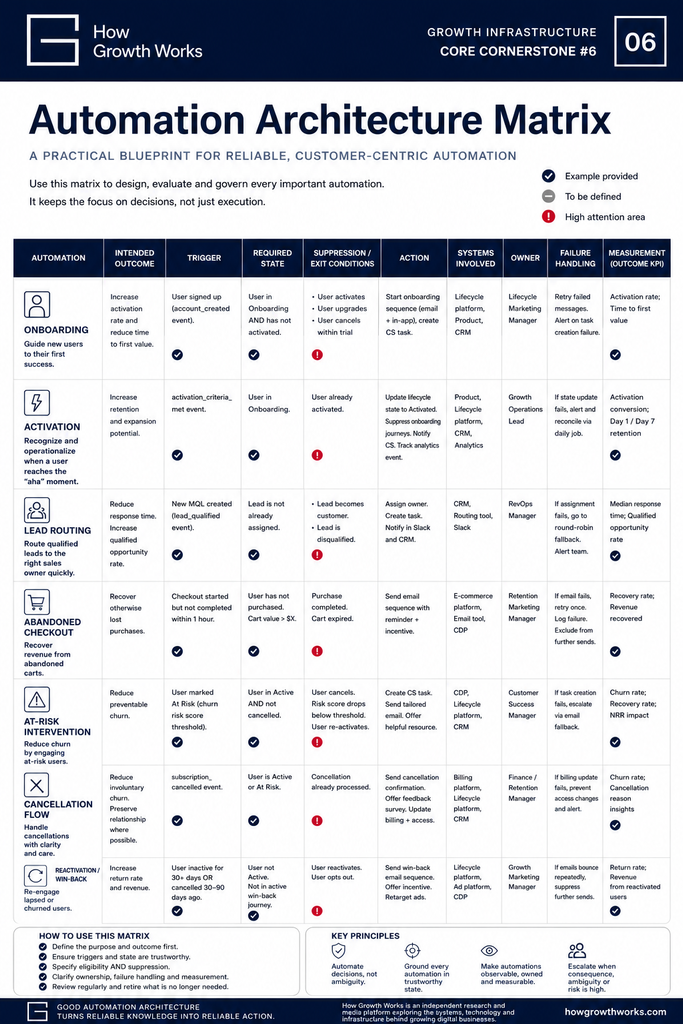
5. Automation Architecture Matrix
The following examples are illustrative rather than universal.
6. Automation Decision Matrix
| Ambiguity | Consequence | Reversibility | Recommended treatment |
|---|---|---|---|
| Low | Low | High | Automate |
| Low | High | High/medium | Automate with controls |
| High | Low | High | Constrained automation or AI assistance |
| High | High | Low | Human decision or mandatory escalation |
There is a fourth useful variable: confidence in the underlying data.
Even a deterministic rule should not necessarily be automated when the state driving it is unreliable.
7. How automation architecture differs by business model
B2B SaaS
The key automation problem is often handoff and account context.
Lead qualification, sales ownership, onboarding, product activation, Customer Success risk and renewal may live in different systems.
A mistake affecting one enterprise account can matter substantially more than a mistake involving a low-value self-serve user, so human intervention thresholds tend to be lower.
Self-serve SaaS
Volume makes deterministic automation economically attractive.
Signup, trial, activation, upgrade, failed payment, cancellation and reactivation can often be automated heavily, provided product and billing state are reliable.
Continued eligibility is especially important because customer state can change rapidly without human involvement.
E-commerce
Automation is often highly event-driven:
browse behavior;
cart creation;
purchase;
fulfilment;
repeat purchase.
But commercial events must override marketing assumptions quickly. An abandoned-cart journey that continues after purchase is an obvious eligibility failure.
Subscription media
Subscription state, engagement and marketing permission may diverge.
A subscriber can cancel renewal while retaining access. A former subscriber may remain a newsletter reader.
Automation therefore needs to distinguish commercial state from communication eligibility.
Education
Progress rarely follows a simple elapsed-time schedule.
A better architecture may combine time with actual learning state:
14 days after enrolment AND course not started
is more meaningful than simply:
14 days after purchase.
Completion may end progression messages but begin alumni, certification or next-step communication.
8. Claims suitable for future HGW testing
These are reasonable operator hypotheses rather than established universal facts:
- Whether state-aware lifecycle automations materially reduce inappropriate messaging compared with traditional time-sequence automation.
- How often small and mid-sized businesses currently have contradictory automation logic across CRM and lifecycle platforms.
- Whether maintaining an automation registry materially reduces automation debt.
- The practical latency threshold at which delayed customer-state propagation becomes customer-facing.
- How reliably Zapier, Make and n8n workflows recover from partial execution across typical SaaS stacks.
- Whether AI-assisted classification improves lifecycle decision quality enough to justify increased operational complexity.
- Which automation decisions benefit most from human approval versus constrained autonomous execution.
These would all lend themselves to future HGW Lab experiments.
9. Finished cornerstone article
Marketing Automation Architecture: What Should Actually Be Automated?
Marketing automation usually begins with a reasonable idea.
A welcome email should send automatically.
A qualified lead should be assigned to Sales.
An abandoned checkout should trigger a reminder.
A cancelled subscription should stop renewal messaging.
Then another automation gets added.
And another.
A CRM workflow updates a field. A Zap copies it somewhere else. The lifecycle platform watches that field and starts a campaign. A billing event triggers another workflow. Customer Success receives a task. Someone adds an AI step to classify the account.
Each individual automation may make sense.
Collectively, the business can develop an invisible operational system that nobody fully understands.
Eventually nobody is quite sure:
which automation owns a decision;
which customer data it depends on;
whether another workflow does the same thing;
what happens when one system fails;
or whether an automation can safely be turned off.
This is automation architecture.
And it begins with a different question from the one most automation software encourages you to ask.
Not:
What else can we automate?
But:
Which decisions are sufficiently understood, reliable and repeatable that the business should execute them automatically?
What Marketing Automation Actually Is
Marketing automation is often defined as software that automates repetitive marketing tasks.
That description is technically true and strategically weak.
It makes automation sound like a productivity feature.
A more useful definition is:
Marketing automation is the automated execution of predefined customer-facing or growth-operational decisions and actions in response to governed events, state, attributes, timing or calculated conditions.
The distinction matters.
An email does not send “because automation.”
Some condition was interpreted as meaning:
This customer should receive this communication now.
A salesperson was not automatically assigned by magic.
Some combination of facts led the system to conclude:
This lead belongs to this person or team.
The workflow is executing a decision.
The quality of the automation therefore depends partly on the quality of the decision underneath it.
This leads to the central principle:
Automation should remove predictable execution from decisions the business has already made. It should not automate ambiguity the business has failed to resolve.
Automation Starts Upstream of the Workflow
Reliable automation does not begin inside Zapier, HubSpot, Customer.io, Braze, n8n or any other workflow builder.
It begins with trustworthy facts.
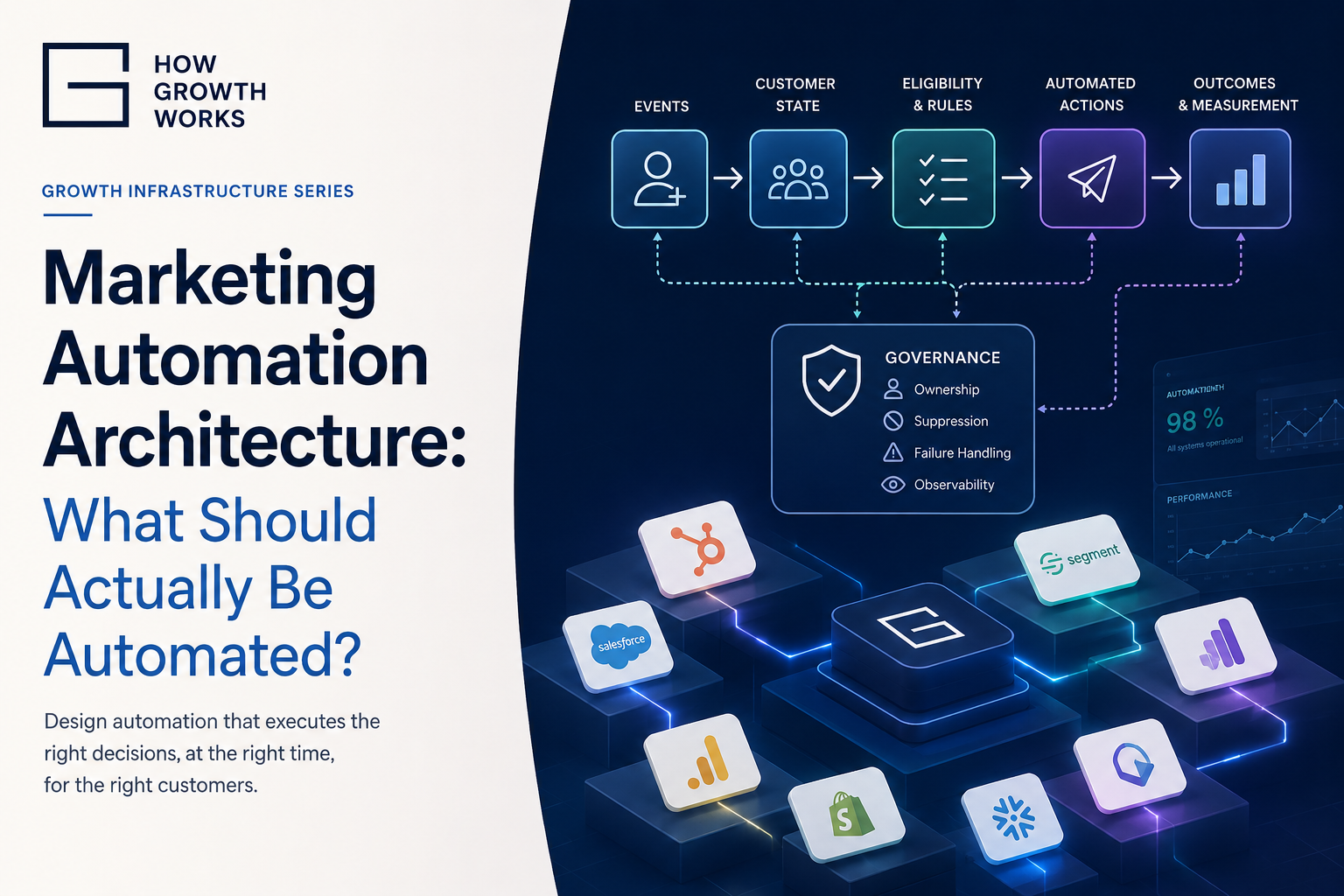
The architecture is closer to:
AUTHORITATIVE FACT / EVENT
↓
CUSTOMER STATE
↓
ELIGIBILITY / DECISION
↓
AUTOMATED ACTION
↓
OUTCOME
↓
MEASUREMENT
Consider activation.
The product establishes that the customer has satisfied the defined activation criteria.
That changes the customer’s product state from Onboarding to Activated.
The customer is therefore no longer eligible for beginner onboarding.
The lifecycle platform stops the onboarding sequence and begins the appropriate active-customer treatment.
Analytics records the transition.
That is considerably stronger than:
Customer has Tag X → send Email Y.
Tags are not inherently bad.
But when the business no longer understands who created the tag, why it is still present, whether it represents current state or whether another system can safely change it, the automation is operating on accidental infrastructure.
This is why automation architecture depends directly on customer-state architecture.
Before automating the action, make the underlying decision legible.
What Should Actually Be Automated?
The best automation candidates tend to share several characteristics.
The action occurs frequently enough to justify removing manual execution.
The decision is predictable enough to express clearly.
The required information is available and trustworthy.
The consequences of occasional error are acceptable or recoverable.
Speed or consistency adds value.
The outcome can be observed.
That gives us a practical test.
Before automating something, ask:
What starts this?
What decision are we making?
What facts justify that decision?
How ambiguous is it?
What happens if those facts are wrong?
What action follows?
Can the action be reversed?
Who owns it?
How will we know whether it worked?
A weekly internal notification based on a clean data condition may pass easily.
Automatically terminating a high-value customer relationship based on an uncertain churn classification should face a much higher threshold.
The correct automation boundary depends not simply on whether something can be automated, but on the combination of ambiguity, consequence and reversibility.
Do Not Automate a Process Merely Because It Is Manual
Manual work can indicate inefficiency.
It can also indicate judgement.
Those are not the same problem.
Imagine a Customer Success manager manually reviewing enterprise accounts approaching renewal.
Some of that work may be unnecessary data gathering that should be automated.
But the final decision about how to approach a large, politically complex account may depend on information that is difficult to encode:
recent conversations;
stakeholder changes;
commercial negotiation;
relationship history;
internal politics;
unusual contractual circumstances.
Automating the information gathering may be excellent.
Automating the entire decision may not be.
A useful sequence is:
Understand → Standardize → Automate → Measure → Improve
If the process itself changes every week, automation may simply freeze an immature process into software.
The result is not operational excellence.
It is automated confusion.
Trigger Is Not the Same as Eligibility
This is one of the most important distinctions in automation architecture.
Most workflows define what causes someone to enter.
Far fewer businesses think as carefully about what must remain true afterward.
Customer.io explicitly separates triggers from filters and exit conditions, and can re-evaluate relevant conditions as people move through a workflow. (Customer.io)
Consider onboarding.
A customer signs up on Monday.
That event correctly triggers an onboarding journey.
Three hours later, the customer activates.
On Wednesday, the workflow reaches:
Send Beginner Setup Email #2.
Should it send?
If the workflow only remembers:
customer_entered_onboarding = true
then perhaps it does.
A stronger architecture checks:
current_state = Onboarding
before sending.
The person was eligible to enter.
They are no longer eligible to continue.
Every important automation should therefore distinguish at least three things:
Trigger
What causes the process to begin?
Eligibility
What must remain true for an action to be appropriate?
Suppression or exit
What condition should immediately prevent or terminate the action?
For acquisition messaging:
Suppress if customer purchases.
For expansion messaging:
Suppress if account becomes At Risk or cancels.
For onboarding:
Exit or change treatment when activation occurs.
For reactivation:
Suppress if the customer has already returned.
This sounds obvious.
Yet many contradictory customer journeys exist because a workflow remembers why someone entered and never asks whether that reason is still relevant.
Time Is Usually a Weak Source of Context
Time-based automation is useful.
It is also easy to misuse.
Consider:
Seven days after signup → send onboarding email.
That tells you how much time passed.
It does not tell you what happened during those seven days.
Compare:
Seven days after signup AND customer remains in Onboarding → send onboarding email.
The second rule contains customer state.
Better still might be:
Seven days after signup AND customer remains in Onboarding AND has not completed Setup Step X → send relevant guidance.
Time becomes one condition rather than the entire decision.
This is an important shift from scheduled messaging toward state-aware lifecycle automation.
Automation and Orchestration Are Different Problems
An automation might say:
When event X happens, perform action Y.
But important customer transitions often affect multiple systems.
Suppose a customer becomes Activated.
The business may need to:
stop onboarding;
update CRM visibility;
record the activation milestone;
change product messaging;
alter experiment eligibility;
make Customer Success aware;
eventually permit expansion treatment.
No single workflow necessarily owns that entire customer transition.
The broader problem is orchestration: ensuring several systems respond coherently to the same underlying change.
This distinction matters because businesses often optimize individual workflows while leaving the overall customer journey contradictory.
Every automation can work exactly as configured while the system as a whole produces nonsense.
Where Should Automation Logic Live?
There is no universal answer.
Logic can live in:
the CRM;
lifecycle platform;
billing system;
product backend;
data warehouse;
integration platform;
custom code;
or increasingly an AI-agent layer.
The wrong question is:
Which tool is best for automation?
The better question is:
Which system is the most appropriate place for this particular decision?
Consider:
Which system knows the authoritative triggering fact?
Which system performs the action?
How many other systems depend on the decision?
How quickly must it happen?
What happens if it runs twice?
How easily can the workflow be observed?
Who will maintain it?
A useful rule is:
Keep important business logic as close as practical to the reliable facts it depends on, while avoiding unnecessary duplication of the same logic across multiple tools.
If both your CRM and lifecycle platform independently calculate whether somebody is Activated using different rules, you have created two versions of the decision.
That is usually weaker than calculating activation authoritatively and distributing the result.
Every Important Automation Needs an Owner
“The Zap was built by James three years ago” is not an ownership model.
Ownership means someone is accountable for the automation’s continued correctness.
They should understand:
its purpose;
trigger;
inputs;
dependencies;
actions;
failure handling;
measurement;
and whether it still needs to exist.
This becomes increasingly important as automation accumulates.
A workflow without an owner tends to become permanent simply because nobody feels confident enough to remove it.
That is one form of automation debt.
Automation Debt Is Part of Stack Debt
A business has automation debt when automated processes continue running even though their logic, dependencies, ownership or purpose are poorly understood.
The symptoms are familiar:
Nobody knows what a workflow does.
People are afraid to disable it.
Two automations appear to perform the same action.
A field changes mysteriously.
An integration periodically expires.
An old campaign still receives customers.
The CRM and lifecycle platform contain contradictory logic.
The company has 140 Zaps and nobody knows which 30 matter.
Automation originally reduced complexity for the operator executing the task.
Over time, unmanaged automation transferred that complexity into the infrastructure.
This is why more automation is not automatically more operationally mature.
Sometimes deleting five obsolete workflows creates more value than building another one.
Maintain an Automation Registry
Once automation becomes operationally important, the business should know what is running.
That does not require enterprise process-management software.
A spreadsheet may be enough.
For each significant automation, record:
Name
Purpose
Trigger
Eligibility
Suppression / exit
Systems involved
Owner
Customer impact
Failure mode
Outcome metric
Status
This has a second benefit.
When conducting a Growth Stack Audit, you are no longer merely inventorying technology.
You can see the decisions connecting the technology.
That is a much better representation of how the business actually operates.
Design for Duplicate Events
Distributed systems do not always deliver every event exactly once.
Retries happen.
Webhooks can be duplicated.
A workflow may restart after failure.
AWS explicitly recommends idempotent processing where duplicate messages are possible, while Stripe exposes idempotency keys to make retried API actions safe. (AWS Documentation)
The engineering term is idempotency.
Growth operators do not need to master the computer-science theory.
They need to understand the practical question:
If this instruction is processed twice, what happens?
If lead_qualified arrives twice, should Sales receive two tasks?
If checkout_abandoned arrives twice, should the customer receive two identical messages?
If issue_coupon runs twice, should two vouchers be generated?
If payment_succeeded is replayed, should the lifecycle state be duplicated?
For low-impact actions, the answer may not matter much.
For high-impact actions, duplicate protection belongs in the design.
What Happens When Automation Fails?
Most automation diagrams show the happy path:
Event → Workflow → Success.
Real systems also experience:
API downtime;
authentication expiry;
rate limits;
malformed data;
delayed events;
duplicated events;
partial workflow completion;
network failures.
AWS recommends patterns such as retries with backoff for transient failures, idempotency for safe reprocessing and dead-letter queues for persistent failures. (AWS Documentation)
A small marketing team does not need to implement those patterns exactly as an engineering team would.
But it should understand the underlying principle:
Critical automation should have an observable failure state.
Imagine:
Billing records cancellation.
The CRM update succeeds.
The lifecycle-platform API call fails.
Analytics receives the cancellation event.
The workflow itself technically ran.
But the customer’s state has now diverged across systems.
If nobody can see that failure, the automation has created hidden inconsistency.
For important workflows, define:
What gets retried?
For how long?
What happens after repeated failure?
Who is alerted?
Can the failed action be replayed?
Is manual correction possible?
Silent failure is often more dangerous than visible failure.
Observability Is Part of Automation Architecture
You should ideally be able to determine:
what ran;
why it ran;
for whom;
which data it used;
what action it attempted;
whether that action succeeded;
what happened afterward.
Customer.io provides journey-level histories for individual profiles, while n8n exposes workflow execution histories and retry functionality. (Customer.io)
The sophistication required depends on the business.
A small company with fifteen simple automations does not need a dedicated observability platform.
But once revenue-critical or customer-sensitive decisions depend on automation, “I think the Zap usually works” is not sufficient operational knowledge.
Successful Execution Is Not Business Success
An automation platform can tell you:
1,000 customers entered.
997 reached the final workflow step.
That tells you something important.
It does not tell you whether the automation was worth running.
An onboarding workflow may execute perfectly while having no effect on activation.
A lead-routing automation may assign every lead correctly but fail to improve response time.
A retention workflow may reach every At Risk customer while producing no improvement in recovery.
Separate:
Operational metrics
Did the automation execute correctly?
From:
Outcome metrics
Did the intended customer or business result improve?
Customer.io’s own architecture distinguishes workflow execution from goals or conversion criteria, which reflects this separation. (Customer.io)
Be equally careful about causality.
Customers who received an automation and later performed better do not automatically prove that the automation caused the difference.
Sometimes the customers who qualified for the workflow were already different.
Experimentation or stronger comparative analysis may be needed before making causal claims.
AI Changes the Automation Boundary
Traditional automation is mostly deterministic.
If X, do Y.
AI introduces decisions that are probabilistic.
An AI system might:
classify a lead;
interpret customer intent;
summarize an account;
identify potential churn;
draft a reply;
recommend an offer;
select a next-best action.
This creates three useful levels of automation.
Deterministic automation
Known rule → known action.
Example:
Subscription cancelled → suppress renewal emails.
AI-assisted automation
AI produces information, but another system or person controls the consequential action.
Example:
AI summarizes an At Risk account → Customer Success decides what to do.
Agentic automation
AI chooses and executes an action within its permissions.
Example:
An agent evaluates customer context, chooses an intervention and sends it.
The more autonomous the system becomes, the stronger the surrounding controls should generally become.
That means better:
context;
permissions;
state reliability;
provenance;
logging;
reversibility;
escalation.
A useful principle is:
The less deterministic the decision, the stronger the control architecture should become.
AI does not remove the need for clearly defined customer state.
It makes ambiguous state more dangerous.
Execute, Recommend or Escalate?
Not every decision needs a binary choice between “manual” and “automated.”
There are at least three modes:
Execute
The system takes the action.
Best suited to relatively predictable, low-ambiguity decisions with bounded consequences.
Recommend
The system gathers information or proposes an action, but a person decides.
Useful when automation can remove cognitive or administrative work without removing judgement.
Escalate
The system recognizes that a situation falls outside the normal deterministic path and routes it to someone capable of handling the exception.
Consider:
A low-risk onboarding email → execute.
A potentially valuable account displaying churn signals → recommend an intervention.
An unusual enterprise cancellation with conflicting account data → escalate.
Mature automation is therefore not defined by eliminating humans.
It is defined by using human judgement where it adds the most value.
A Practical Automation Architecture Method
You can design most automation using eight steps.
1. Define the outcome
What should improve?
2. Define the decision
What judgement determines whether an action should happen?
3. Identify authoritative inputs
Which events, states and attributes justify that decision?
4. Decide the appropriate automation level
Assess ambiguity, consequence and reversibility.
Choose:
Automate
Automate with controls
Assist
Keep human
5. Define lifecycle logic
Document:
Trigger
Eligibility
Suppression
Exit
6. Choose execution and ownership
Where should the logic live?
Who is responsible for it?
7. Design failure handling
What happens when data is missing, APIs fail or events duplicate?
8. Measure and review
Did the automation execute correctly?
Did the intended outcome improve?
Does this automation still deserve to exist?
That last question matters.
Automation should be removable.
The Goal Is Not Maximum Automation
There is a seductive idea in growth operations that a sufficiently sophisticated business should eventually automate almost everything.
That is the wrong objective.
Every automation creates dependencies.
Every integration creates another failure surface.
Every rule creates logic someone must eventually understand.
Every customer-facing automated action creates some possibility of being wrong.
Automation is valuable when those costs are lower than the value created by consistent, timely execution.
The strongest growth infrastructure therefore does not maximize automation.
It makes deliberate choices about:
which decisions should be automated;
which facts those decisions depend on;
what customer state makes actions appropriate;
when automation should stop;
where human judgement remains valuable;
and what happens when the system fails.
That is the deeper meaning of marketing automation architecture.
Growth infrastructure becomes professional not when more activity is automated, but when the business becomes explicit about which decisions can safely be automated, which facts those decisions depend on, and how automated actions fit into the wider customer journey.
Leave a Reply